Cloudflare Pages makes static site hosting convenient — push your code, and it handles the build and deployment automatically with generous free tier. However, access from mainland China has always been a pain point: high latency and occasional unavailability make for a poor reading experience.
Migrating away from CF Pages isn’t appealing when the Git-based deployment flow works so well. A practical compromise is to place Tencent Cloud EdgeOne (International) in front of CF Pages as an acceleration layer. You keep your existing setup and gain significantly faster loading times for users in China.
Here’s how I configured it, along with a few issues I ran into.
Overall Idea
- Cloudflare Pages continues to serve as the origin — handling hosting and automatic deployments.
- EdgeOne acts as the CDN and security layer. Requests hit EdgeOne first; if the content is cached, it’s returned immediately, otherwise the request goes back to CF Pages.
Traffic flow: User → EdgeOne edge node → CF Pages (origin)
Configuration Steps
Step 1: Add Your Site to EdgeOne
Log into the EdgeOne console, click “Add Site”, and enter your root domain (e.g., yourdomain.com). Choose a plan and coverage region as needed — for optimizing mainland China access, select Mainland China (if real-name verification is completed) or Global.
Step 2: Add a Domain and Configure Origin
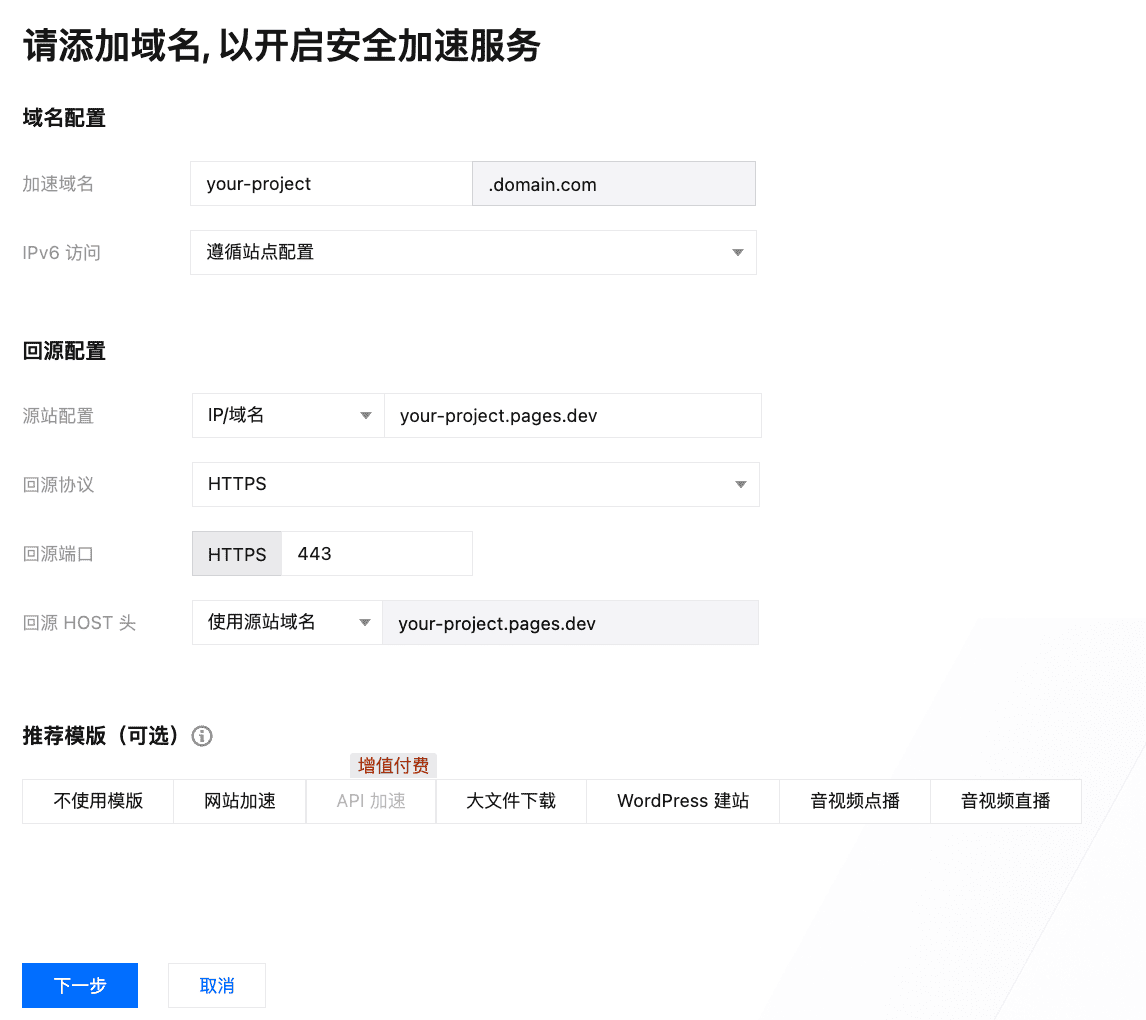
Inside your site, go to domain management and add the domain your users will actually visit, such as blog.yourdomain.com. The critical part is the origin configuration:
- Origin address: Use the default domain assigned by CF Pages, like
your-project.pages.dev. No need to attach a custom domain. - Origin protocol: Choose HTTPS, port 443. CF Pages only accepts HTTPS; picking HTTP will cause problems later.
- Origin HOST header: Select “Use origin domain”, which will automatically fill in
your-project.pages.dev.
This last setting is easy to overlook. If you don’t override the HOST header, EdgeOne will forward the user-facing blog.yourdomain.com to CF, which won’t recognize it and will return a 404.
The recommended template “Website Acceleration” is a good fit for static-heavy sites.
Step 3: Certificate and DNS
First, go to your DNS provider and change the record for blog.yourdomain.com to a CNAME pointing to the *.edgeone.com address EdgeOne assigned you.
Then, back in the EdgeOne console, apply for a free certificate for this domain under Certificate Management. It will be issued within minutes once the CNAME takes effect.
Issues and Optimizations
1. Infinite Redirect Loops
If your browser complains about too many redirects, it’s almost certainly because the origin protocol in EdgeOne is set to HTTP while CF enforces HTTPS. CF receives the HTTP request, responds with a 301 redirect to HTTPS, EdgeOne again uses HTTP… repeat indefinitely. Switching the origin protocol to HTTPS solves it.
2. Caching Strategy
By default, CF Pages sends max-age=0, which prevents intermediate CDNs from caching. That defeats the purpose of adding EdgeOne.
You can override this with a rule in EdgeOne’s Rule Engine: for file extensions like *.js, *.css, *.png, *.jpg, set forced caching with a TTL of 7 to 30 days. After the first load, subsequent visits will be much faster.
3. Security
It’s worth enabling the built-in WAF and CC Protection features. Malicious requests get blocked at the edge, never reaching your origin.
Conclusion
After running this setup for a while, latency from various locations in China dropped from 300ms+ (or timeouts) to around 30-40ms. Pages load noticeably faster, and I didn’t need to change my deployment workflow at all. If you’re struggling with CF Pages’ performance in China, give this approach a try.