Process States
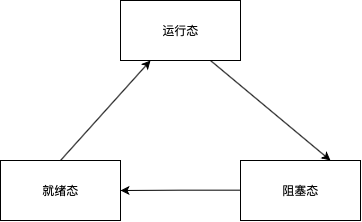
A process typically exists in one of three fundamental states:
- Running State: The process is currently executing on the CPU.
- Ready State: The process is prepared to execute but is waiting for the CPU to be allocated to it.
- Blocked State: The process is waiting for some event to occur (such as I/O completion or resource availability) before it can continue execution.
A newly created process initially enters the Ready state. When the operating system’s scheduler selects this process for execution, it transitions to the Running state. If the running process is interrupted by the system (e.g., time slice expiration) or if a higher-priority process requires the CPU, it transitions back to the Ready state. If the process requires a resource that is currently unavailable, it transitions to the Blocked state. Once that resource becomes available, the process is moved back to the Ready state to await scheduling.
Other States
Some operating systems utilize additional states to provide finer control:
- New State: The state when a process is first being created.
- Terminated State (or Zombie state in some contexts): The state when a process has finished execution.
Timesharing Systems
The timesharing system was a groundbreaking innovation in the 1960s and 70s. It utilizes visualization to allocate a virtual processor (virtual CPU) to each process. This approach offers several key benefits:
- It enables multi-user support on a single computer through process isolation.
- It allows the simulation of different processor architectures to ensure program compatibility.
Process Control Block (PCB)
The operating system manages all processes running within its environment using a data structure known as the Process Control Block (PCB). After a user logs in, the first program typically executed is either a GUI or a Shell. While specific implementations vary, PCBs across different operating systems share similar components. The following table highlights common information stored within a PCB:
| Information | Description |
|---|---|
Process State (process_state) |
Ready, Running, Blocked, etc. |
Process ID (process_id) |
A unique identifier for the process. |
Memory Management Info (memory) |
Limits of allocated memory, page tables, or swap usage (virtual/physical addresses). |
Scheduling Information (scheduling_information) |
Process priority, scheduling queue pointers. |
Open Files (open_files) |
A list or table of files currently opened by the process. |
Register State (registers) |
A copy of the CPU registers (Program Counter, Stack Pointer, general-purpose registers) saved when the process was last suspended. This context is restored when the process resumes running. |
| Parent Process | A pointer to the PCB of the parent process. |
| Child Processes | A pointer to the head of a list (or other structure) representing all child processes. |
Management of PCBs
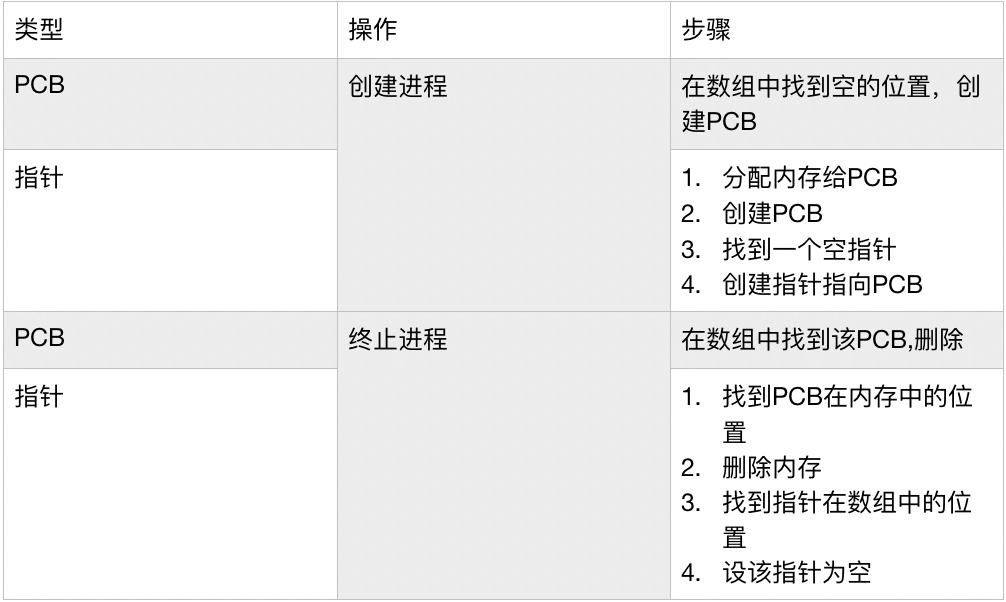
There are two primary approaches to managing PCBs within the OS:
- Direct Array Allocation: PCBs are stored directly in a fixed-size array. This method avoids the complexity of dynamic memory management; new PCBs are simply placed into empty slots. However, it wastes memory if the array is not fully utilized.

- Array of Pointers: An array stores pointers that reference PCBs allocated elsewhere in memory. This approach is more memory-efficient but requires efficient dynamic memory management for allocating and deallocating the PCBs.

Note: Dynamic memory management here refers to the system’s ability to allocate and free memory blocks to accommodate the changing number of active processes.
Here is a summary diagram for review:
Storage of Child Processes in the PCB
Instead of using a simple linked list directly within the PCB structure to track children, Linux employs a more optimized approach using linked lists nodes embedded within the PCB. The diagrams below illustrate this distinction.

In the diagram above, Child Processes 1, 2, and 3 are tracked via a direct linked list pointer system. When Parent Process 0 creates a new Child Process 3, it must append a new node to the end of this list.

By adding a “sibling” pointer field to every PCB, a separate, complex linked list mechanism becomes redundant. When Parent 0 adds Child 3, it simply links Child 3 to its existing sibling (Child 2). The parent only needs to point to its first child.
PCB Management via Lists
The operating system organizes all PCBs using several Process Lists.
The Waiting List (or Blocked List) tracks all processes currently in the Blocked state (where process_state is blocked). (Note: The state information is typically represented by an integer or character enum, not a literal string).
The Ready List tracks all processes in the Ready state (process_state is ready). This list is sorted according to a specific scheduling policy. I will organize my notes on scheduling algorithms later; for now, understand that this list is continuously updated to balance fairness and priority requirements, ensuring all ready processes eventually receive CPU time.
Process Termination
When a process terminates, different operating systems handle its orphaned child processes in various ways. Some systems re-parent these orphaned processes to a distinguished system process (often the init process, the ancestor of all other processes). Other systems may choose to perform a cascading termination, deleting all child processes along with the parent.
Resource Control Block (RCB)
Note: The concept of the Resource Control Block might appear primarily in theoretical texts; use discretion, as implementation details vary widely.
In addition to Process Control Blocks, an operating system may utilize a Resource Control Block (RCB) to manage system resources. Similar to the PCB, its structure generally resembles the following table:
| Information | Description |
|---|---|
| Resource Description | Attributes and purpose of the resource. |
| State | Current availability or usage status of the resource. |
| Waiting List | A list of pointers to processes that are currently blocked waiting for this resource. |
When a process requests a specific resource, the system checks the resource’s state within its RCB. If the resource is currently allocated to another process, the requesting process is transitioned from the Running state to the Blocked state, and a pointer to its PCB is added to the resource’s Waiting List. When the resource is released by its current holder, a process from the Waiting List is selected, transitioned to the Ready state, and made eligible for scheduling.
Threads
Prerequisites: An Abstract Model of Execution
Recall that the PCB stores the Register State, which includes crucial registers like the Program Counter (PC) and the Stack Pointer (SP). When a process executes, its code (binary or translated assembly) is loaded into memory. The PC and SP are pointers: the PC points to the next instruction to execute, and the SP points to the current top (or bottom, depending on architecture) of the program stack. As execution proceeds, the PC moves through the code, and operations like function calls or system requests utilize the stack and data segments.

What Exactly is a Thread?
A process can separate certain modules of itself to run concurrently; these independent paths of execution are called Threads. You can visualize a process being split into multiple execution contexts. When a process needs to access a resource, some operations may not strictly depend on that resource immediately. Instead of the entire process blocking, one module (thread) can wait for the resource while other modules continue executing.
Consider a thread created specifically to wait for a resource:
1 | // Pseudocode representing resource acquisition within a thread |
In a single-threaded process, requesting an unavailable resource would block the entire process:
1 | // Single-threaded perspective: Whole process blocks here |
By introducing threads, the process can calculate result1 concurrently while another thread handles the blocking resource acquisition.
With the introduction of threads, scheduling now requires a Thread Control Block (TCB) for each thread. When a thread is created, it gets its own copies of the PC and SP registers, which are stored in its TCB. Threads, like processes, have their own states (Ready, Running, Blocked). While one thread is blocked waiting in the while loop, another thread within the same process can be Running and performing some_calculation().
Referring back to our prerequisite model, because there are now multiple sets of PC and SP registers, we can visualize multiple execution points actively working through the process’s address space.

User-Level Threads and Kernel-Level Threads
Threads generally fall into two categories: User-Level Threads (ULTs) and Kernel-Level Threads (KLTs). (Terminology may vary, sometimes referred to as ‘lightweight processes’ vs. ‘kernel threads’). ULTs are managed entirely by a user-space threading library; the kernel is completely unaware of their existence. KLTs, in contrast, are managed directly by the operating system kernel and require kernel system calls for creation and management, similar to processes.
Advantages of User-Level Threads (ULTs):
- They are significantly faster and easier to create and manage than KLTs (no context switching to kernel mode).
- A application can create a very large number of ULTs.
- Applications using ULTs are often easier to port to other operating systems because they rely less on specific kernel features.
Disadvantages of User-Level Threads (ULTs):
- Since the OS kernel is unaware of individual ULTs, if any single thread executes a blocking system call, the entire process (and all other threads within it) enters the Blocked state.
- ULTs cannot take advantage of multiprocessing environments effectively, as the scheduler perceives the entire process as a single unit of execution.
Many modern operating systems use a hybrid model to combine the strengths of both approaches. By mapping User-Level Threads onto Kernel-Level Threads (e.g., in a many-to-many or many-to-one model), the system ensures that even if one ULT blocks, other threads within the application can continue running by utilizing available KLTs from a kernel-managed thread pool.