Computer Composition
A fundamental computer system can be broken down into three main components:
- Central Processing Unit (CPU)
- Memory
- I/O Devices
To understand their interplay, visualize the computer as a professional restaurant kitchen. The CPU is analogous to the head chef, managing the entire process. Memory serves as the chef’s prep counter (or cutting board); it is a temporary workspace where ingredients (data) are laid out before they are processed by the chef (the CPU). I/O devices constitute all other necessary but non-core items in the restaurant (ingredients, equipment, storage, service, etc.).
The Role of an Operating System
The Bridge
From one perspective, an Operating System (OS) is primarily a bridge connecting hardware and software. The OS encapsulates a collection of complex operations that control the underlying hardware, exposing easy-to-use, standardized interfaces to users and applications. This allows users to leverage rich application ecosystems and develop new software efficiently and safely without needing to understand the intricacies of every hardware device.
The Extended Machine
Alternatively, we can view the system as an extended machine, where its two primary jobs are abstraction and virtualization.
Consider the common task of a user reading or writing a file. From a purely low-level hardware perspective, this operation is both tedious and complex:
- Calculate and locate the exact physical sector on the disk platters where the file data resides.
- If necessary, manage memory by clearing existing data to allocate sufficient space for the incoming file information.
- Physically move the disk’s read/write head assembly to the correct track.
- Perform boundary checks to ensure the requested data doesn’t exceed the file’s allocation.
- Perform memory boundary checks to avoid buffer overflows.
- Finally, read the file data into the designated memory location.
Through abstraction, the operating system hides these tedious low-level details. It offers a simple, uniform interface to the user. For instance, a user might only need to execute a simple function call like read("/path/to/file") to retrieve the entire file, without worrying about disk cylinders or sectors.
Virtualization, in this context, refers to the OS providing each distinct process with an independent, virtual representation of resources. To a process, it appears to have exclusive access to a wealth of resources that are actually a virtual illusion managed by the OS. A key example is virtual memory, where the OS gives each process a continuous virtual address space; behind the scenes, these virtual addresses are mapped to non-contiguous, potentially fragmented physical memory locations.
Resource Management
Finally, an Operating System is a massive, complex resource manager. The primary example of resource management is multitasking: a single CPU appears to run multiple programs simultaneously by switching rapidly between them (time-sharing). Returning to our restaurant kitchen analogy, this is akin to a skillful chef knowing how to manage their time (and resources) by working on different preparations, such as cutting vegetables while waiting for a dish to finish simmering.
The Structure of an Operating System
The Operating System itself is exceedingly complex. Certain core functions are absolutely essential and must always be running to ensure system stability and security; this collection of core components is known as the kernel.
To support this structure, CPU instructions are divided into two fundamental types:
- Privileged Instructions: Instructions capable of performing direct hardware manipulation or accessing restricted memory areas.
- Non-Privileged Instructions: Standard computational or memory access instructions suitable for application software.
For security reasons, privileged instructions can only be executed by the system kernel. This boundary is enforced by the hardware itself using two primary CPU operation modes: Kernel mode (also known as privileged mode or supervisor mode) and User mode.
- In Kernel mode, the CPU has unrestricted access to execute all instruction types—both privileged and non-privileged.
- In User mode, the CPU is restricted; any attempt to execute a privileged instruction results in a trap (or exception) that transfers control back to the kernel.
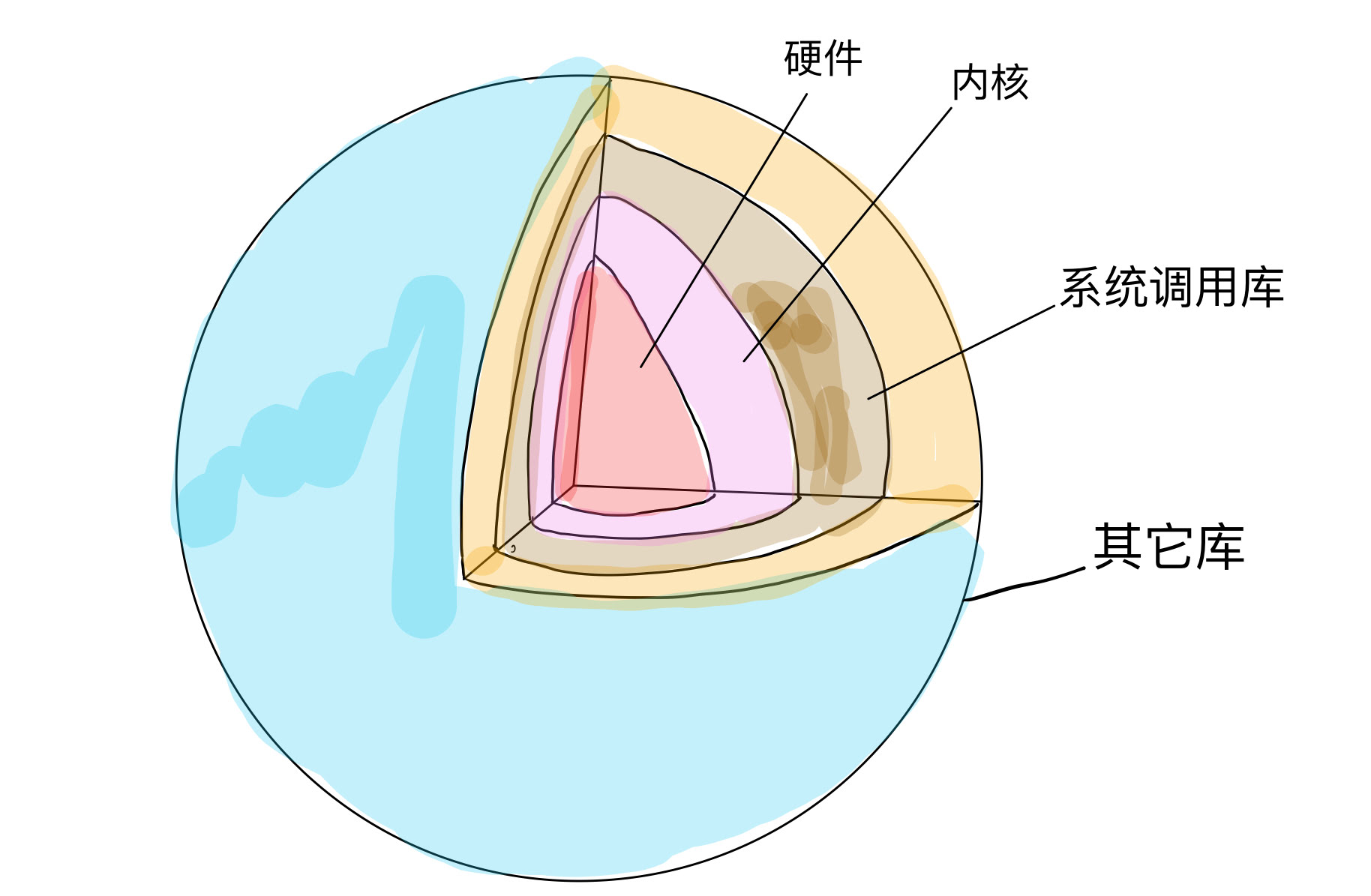
The kernel is responsible for all operations that involve direct communication with hardware (e.g., driver interaction). The OS layers these capabilities through encapsulation and abstraction, ultimately providing a library of secure and convenient System Calls (System Call Interface or System Call APIs) for software applications. Often, an additional layer of General Libraries (such as the standard C library, libc) is wrapped around these raw system calls to provide a more developer-friendly interface. While higher-level user applications can certainly execute CPU instructions directly, they are strictly limited to non-privileged instructions; any restricted hardware operation must be performed indirectly via a system call to the kernel.