Searching
Introduction
Problem (Searching)
Given: A collection of elements $A = {a_1, a_2, . . . , a_n}$ and a key element $e_k$.
Output: The element $a_i$ in $A$ that matches $e_k$.
Variations:
- Find the first such element
- Find the last such element
- Find the index of the element
- Key versus “equality” based search
- Find all such elements
- Find extremal element(s)
- Handling failed searches (element does not exist)
Note: The problem is stated in general terms; in practice, searching may be done on arrays, lists, sets, or even solution spaces (for optimization problems).
Linear Search
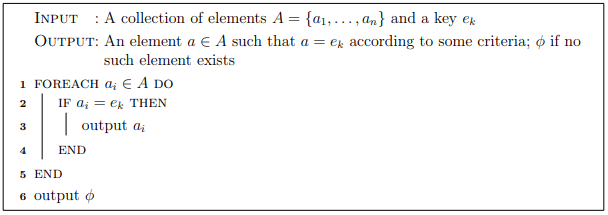
A basic and straightforward solution to the problem is the linear search algorithm (also known as sequential search).
- Basic idea: Iterate over each element in the collection and compare it with the key $e_k$.
Pseudocode
Example
Consider the array of integers in the table below. Walk through the linear search algorithm on this array, searching for the keys: 20, 42, 102, 4.
| Index | 0 | 1 | 2 | 3 | 4 | 5 | 6 | 7 | 8 | 9 |
|---|---|---|---|---|---|---|---|---|---|---|
| Element | 42 | 4 | 9 | 4 | 102 | 34 | 12 | 2 | 0 | - |
Analysis
As the name suggests, the complexity of linear search is linear.
- Input: The collection of elements $A$
- Input size: $n$, as there are $n$ elements
- Elementary Operation: The comparison to the key in line 2
- Best case: We immediately find the element; $O(1)$ comparisons
- Worst case: We don’t find it, or we find it at the last element; $n$ comparisons, $O(n)$
- Average case (details omitted): An expected number of comparisons of $\frac{n}{2} \in O(n)$
Binary Search
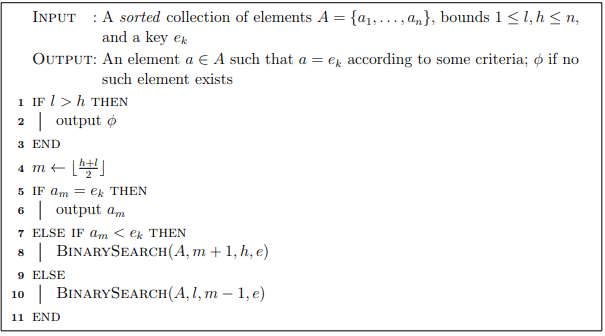
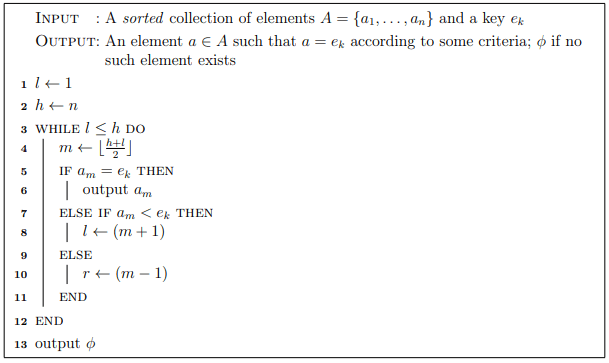
A much more efficient way to search is the binary search algorithm. The basic idea is as follows. Under the assumption that the collection is sorted, we can:
- Examine the middle element:
- If the middle element is what we are searching for, we are done.
- If the element we are searching for is less than the middle element, it must lie in the lower half of the list.
- Otherwise, it must lie in the upper half of the list.
- In either case: The list is cut in half (at least); we can repeat the operation on the sub-list.
- We continue until either: We find the element that matches the key, or the sub-list is empty.
Pseudocode: Recursive
Pseudocode: Iterative
Example
Consider the array of integers in the table below. Walk through the binary search algorithm on this array, searching for the following keys: 20, 0, 2000, 4.
| Index | 0 | 1 | 2 | 3 | 4 | 5 | 6 | 7 | 8 | 9 | 10 | 11 | 12 | 13 | 14 | 15 |
|---|---|---|---|---|---|---|---|---|---|---|---|---|---|---|---|---|
| Element | 0 | 2 | 4 | 4 | 9 | 12 | 20 | 21 | 23 | 32 | 34 | 34 | 42 | 102 | 200 | 1024 |
Analysis
Input: Collection of elements $A$
Input size: $n$, the number of elements
Elementary Operation: Comparison, performed once for each “middle” element
Analysis:
- Let $C(n)$ be the (maximum) number of comparisons made by binary search on a collection of size $n$.
- On each recursive call, one comparison is made, plus the number of comparisons on the next recursive call.
- The list is cut in half, so the next recursive call will contribute $C(\frac{n}{2})$.
- In total: $C(n) = C(\frac{n}{2}) + 1$
- By Case 2 of the Master Theorem, Binary Search is $O(\log n)$.
Another view:
- We begin with a list of size $n$.
- After the first iteration, it is halved: $\frac{n}{2}$.
- After the second, it is halved again: $\frac{n}{2^2}$.
- After $i$ such iterations: $\frac{n}{2^i}$
- The algorithm terminates when the list is of size 1 (actually zero, but we’ll treat the last iteration separately): $\frac{n}{2^i} = 1$
- Solving for $i = \log_2 n$; thus $O(\log n)$ iterations.
Contrast binary search with linear search: suppose we wanted to search a database with 1 trillion ($10^{12}$) records.
- Linear search: Requires approximately $10^{12}$ comparisons.
- Binary search: Requires approximately $\log_2(10^{12}) \approx 40$ comparisons.
Suppose further that a list initially has $n$ elements and its size is doubled; then:
- Linear search: Requires twice as many comparisons on the new list.
- Binary search: $\log_2(2n) = \log_2(2) + \log_2 n = \log_2 n + 1$; that is, only one more comparison than before.
Considerations:
- Binary search requires an up-front, $O(n \log n)$ cost to sort (or less if order is maintained).
- If searching only once, there is no need to sort; just use linear search.
- If repeated, even a small amount (say $O(\log n)$ searches), then it pays to sort and use binary search.
Searching in Java
Linear Search
1 | /** |
Binary Search
1 | /** |
1 | /** |
Preventing Arithmetic Errors
The lines of code that compute the new mid-index, such as:
1 | int middleIndex = (high + low) / 2; |
are prone to arithmetic errors when dealing with very large arrays. Specifically, if the sum of high and low exceeds the maximum value a signed 32-bit integer can hold ($2^{31} - 1 = 2,147,483,647$), overflow will occur before the division by 2, leading to a potentially negative result.
One solution is to use a long integer instead. This prevents overflow as long can handle sizes exceeding array limits (arrays are limited to 32-bit signed integer sizes, actually slightly less due to object memory overhead).
Another solution is to use operations that avoid this overflow. For example:
$$ \frac{l+h}{2} = l + \frac{(h-l)}{2} $$
The expression on the right-hand side is not prone to overflow. Thus, the code:
1 | int middleIndex = low + (high - low) / 2; |
will work correctly.
Searching in Java: Doing It Right
In practice, we don’t reinvent the wheel; we don’t write a custom search function for every type and every sorting order. Instead, we:
- Use standard search functions provided by the language.
- Configure behavior using a
Comparatorrather than rewriting Code.
Built-in functions require that the equals() and hashCode() methods are properly overridden.
- Linear search:
List.indexOf(Object o) - Binary Search on collections:
int Collections.binarySearch(List list, Object key)- Searches the specified list for the specified object using the binary search algorithm.
- Returns the index at which the key appears.
- Returns a negative value if not found.
- Requires that the list contains elements that have a Natural Ordering.
- Binary Search on collections with Comparator:
int Collections.binarySearch(List list, Object key, Comparator c)- Searches the given list for the specified object using binary search.
- Uses the provided
Comparatorto determine order (not theequals()method).
- Binary Search with arrays:
Arrays.binarySearch(T[] a, T key, Comparator c)
Examples
1 | ArrayList<Student> roster = ...; // Assuming this is initialized |